
What Is a Multifunction Printer (MFP)? Printer, Scanner & Copier in One Device.
A multifunction printer — usually shortened to MFP — combines printing, scanning and copying in one business device. Modern MFPs can also support secure print, user authentication, cloud services and digital document workflows.
This guide explains how multifunction printers work, the difference between A4 and A3 devices, which features matter in an office, and when a compact MFP or larger floor-standing machine is the better fit.
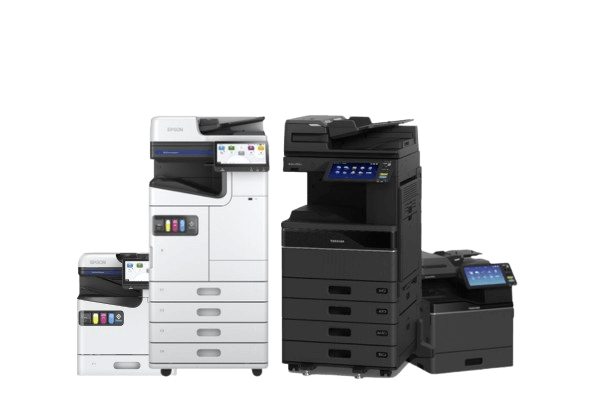
Quick answer: what is an MFP?
An MFP is a multifunction printer: a business machine that combines print, scan and copy functions in one device. Smaller A4 MFPs suit compact teams and departments, while larger A3 multifunction photocopiers can add higher paper capacity, faster scanning, finishing and heavier shared-office workloads.
One device for print, scan and copy.
A modern multifunction printer can replace separate office printers, scanners and photocopiers. The value is not simply having three functions in one box: the correct MFP can reduce device clutter, centralise everyday document tasks and make digital filing easier for staff.
Professional printing
Produce everyday office documents, reports, letters, worksheets, invoices and colour presentation material from one shared device.
Fast document scanning
Scan to email, network folders, cloud workflows or document-management systems, depending on the model and configuration.
Reliable office copying
Handle staff copying, ID documents, school resources, customer packs, internal paperwork and high-use administration tasks.
A4, A3 and workflow-enabled multifunction printers.
MFP stands for multifunction printer. You may also see the terms multifunction device, all-in-one business printer, printer scanner copier or office photocopier used for machines that combine several document functions.
| MFP type | Typical use | Why choose it |
|---|---|---|
| Compact A4 MFP | Smaller teams, departments and standard business documents. | Smaller footprint with print, scan and copy where A3 is not needed. |
| Floor-standing A3 MFP | Shared offices, schools and document-heavy departments. | A3 output, larger paper capacity, faster scanning and more advanced finishing. |
| Workflow-enabled MFP | Organisations with secure print or structured digital filing. | Connects print and scanning with email, network folders, cloud storage, authentication and document workflows. |
What to check before choosing a multifunction printer.
Printer specifications often focus heavily on pages per minute. Speed matters, but the better starting point is how people actually create, scan, share and protect documents.
- Monthly mono and colour print volumes.
- Whether the team needs A3 or only A4 output.
- Scan destinations: email, folder, cloud or document-management system.
- Number of users sharing the machine.
- Security requirements such as PIN print, card release or user authentication.
- Space available for desktop or floor-standing equipment.
- Paper capacity, extra trays, stapling, booklet finishing or larger media requirements.
- Service, toner and ongoing support requirements.
How to choose the right multifunction printer.
The objective is not to buy the biggest machine. It is to match the MFP to the workload, users and document workflow.
- Review document use.Estimate print volumes, colour use, A3 requirements, scan workload and peak periods.
- Map the workflow.Identify where scanned documents need to go: email, folders, cloud storage or a document system.
- Check access and security.Consider PIN release, user authentication, address-book control and confidential-document handling.
- Match size and capacity.Choose A4 or A3, desktop or floor-standing, then specify paper capacity and finishing around real office use.
Common printer scanner copier setups.
Small office A4 MFP
Compact printer scanner copier for smaller teams, administration desks and low-to-medium office volumes.
A3 office photocopier
Floor-standing multifunction photocopier for busier offices, schools, accounts teams and document-heavy departments.
Secure workflow MFP
For teams needing authenticated print release, controlled user access, fast duplex scanning and integration with email, cloud or document workflows.
Why businesses use MFPs for smarter document workflows.
Modern business printing is increasingly about what happens to a document before and after it reaches paper. An MFP can become part of the wider office process rather than simply acting as a shared printer.
Fewer separate devices
Combining print, scan and copy can reduce duplicated equipment and make everyday document handling more practical.
Faster digital filing
Scanning to email, folders, cloud storage or document systems can remove manual steps and help staff file paperwork more consistently.
Better document control
Secure print release, user authentication and controlled workflows can help organisations manage confidential output and understand how shared devices are used.
Where to go next from this MFP guide.
This page explains what a multifunction printer is. Use the commercial pages below when you are ready to compare machines, finance or ongoing support.
Multifunction printer questions answered.
What does MFP stand for?
MFP stands for multifunction printer. It describes a business device that combines functions such as printing, scanning and copying in one machine.
Is a multifunction printer the same as a photocopier?
Modern office photocopiers are usually multifunction devices, so the terms often overlap. A floor-standing A3 photocopier is typically an MFP with print, scan and copy functions, while smaller A4 MFPs provide similar core functions in a more compact format.
Can one MFP replace separate printers and scanners?
Yes, in many offices. A correctly specified MFP can centralise printing, scanning and copying, provided it has the right scan workflow, paper handling, capacity and security for the people using it.
Do I need an A3 or A4 multifunction printer?
A4 is enough for many offices that mainly produce standard business documents. Choose A3 where larger paper, more paper capacity, advanced finishing or heavier shared use makes a floor-standing device more appropriate.
What can a modern MFP scan to?
Depending on the model and configuration, an MFP can scan to email, network folders, USB, cloud storage and document-management systems. Some devices also support searchable documents and automated workflow integrations.
What security features can a business MFP have?
Business MFPs can support features such as user authentication, PIN or card-based print release, encrypted storage, controlled address books and permissions. The exact features depend on the device and configuration.
Need help choosing a multifunction printer?
Tell us how many people will use the device, whether you need A3, your approximate print and scan volumes and any workflow or security requirements. Camelott® can help narrow down the right type of MFP before you compare individual models.