
Photocopiers for Sale New & Used Office Copiers.
Photocopiers for sale from Camelott® include new and professionally prepared used A3 and A4 office machines. We supply businesses, schools and organisations across the UK, with installation and support from our own technical team.
Buying is not automatically the right answer. If keeping your existing machine, leasing or short-term rental makes better commercial sense, we will say so.
- Toshiba GOLD Partner
- New & professionally prepared used
- A3 & A4, colour & mono
- Physical used stock in Telford
Office Photocopiers Available from Camelott®
These are four useful starting points from the current range. The right machine still depends on monthly volume, paper size, colour use, scanning and workflow. For the wider model range, see our office photocopiers hub.
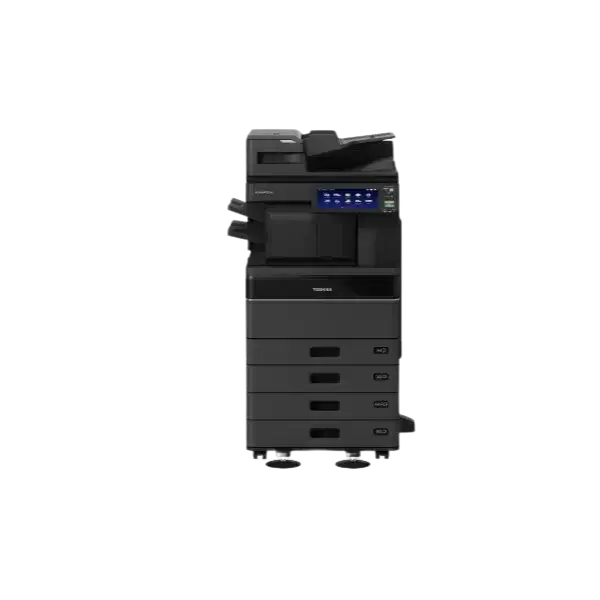
2525AC
A3 colour · 25 ppmOur most commonly sold machine. A practical A3 colour multifunction photocopier for everyday office and school use.
View Toshiba 2525AC331AC
A4 colour · 33 ppmOur A4 all-round recommendation when A3 and stapling or folding are unnecessary: faster and less costly, with the same backend features.
View Toshiba 331ACC2125
A3 colour · 25 ppmA3 colour print, copy and scanning for smaller teams and shared office use.
View Arivia C2125C3135
A3 colour · 35 ppmA faster A3 colour option for shared offices, schools and busier workgroups.
View Arivia C3135Buying an Office Photocopier Outright
Buying can work well when you have available capital, want ownership and expect the machine to remain suitable for several years.
When buying makes sense
- Immediate ownership. The equipment belongs to you rather than a finance provider.
- No equipment-finance term. You are not tied to a multi-year lease for the hardware.
- Keep it while it remains useful. A machine does not need replacing simply because a finance term has ended.
- Choose service separately. Maintenance and managed print can be added without hiding equipment and service inside one figure.
New or professionally prepared used?
New equipment suits organisations that want the longest support life, current security and software compatibility, or a particular feature set.
Professionally prepared used equipment can reduce the capital cost when the machine's age, meter count, history, condition and remaining support life all make sense.
We do not treat “used” as a single condition. A low-meter office machine with a known history is very different from a heavily used machine from a dusty, damp or industrial environment.
Buying a Used Photocopier? Check the Actual Machine.
Do not make the decision from the price, age or salesperson's description alone.
- Check the actual meter reading, service history and previous environment.
- Check physical condition, remaining parts support, software support and warranty.
- If finance is involved, consider how old the machine will be when the agreement ends.
- Descriptions such as “ex-demo” or “low mileage” are not evidence of condition or value.
See stock at our Telford premises
Camelott®'s operational base includes machine preparation, parts, toner and a substantial stock of used equipment. More than 50 used machines can be held in stock, although availability changes.
Where the relevant equipment is available, you can visit, see the machine and discuss the requirement before committing.
Suite B, Unit 2, Stafford Park 6, Telford, TF3 3AT.
Choose the Machine Around How You Actually Work
Paper size and pages per minute matter, but they are only part of the decision. Scanning, users, peak demand and document workflow can matter just as much.
A3 or A4?
Choose A4 if your team mainly uses standard office documents and does not need larger paper. Choose A3 for plans, spreadsheets, posters, booklets, educational resources or regular A3 scanning and copying.
How much speed?
Faster machines cost more. Match speed to real monthly volume, job size and peak queues rather than buying the highest ppm figure available.
Scanning & workflow
Check duplex scanning, scan destinations, print drivers, secure print, Microsoft 365 or Google workflows and the way documents are created before choosing the device.
Two 75ppm Photocopiers. The Machines Were Not the Problem.
A real example of why print problems need diagnosing before equipment is replaced.
A long-standing Camelott® customer producing around 250,000 prints per month was considering changing supplier because print quality had become poor and inconsistent. The same square-shaped artefact was appearing in the same place on output from both 75ppm Toshiba machines. That made a normal copier-engine fault much less likely.
We checked the print path and found incorrect drivers. Correcting them helped, but did not fully solve the problem. Testing the PDFs in the correct Adobe reader improved the output further. We then found the root cause: a CONFIDENTIAL overlay in the customer's document workflow was not being fully flattened, so some PDF renderers interpreted the hidden layer differently.
Replacing the photocopiers would not have fixed the fault. The problem was in the document creation, scanning and PDF-rendering workflow before the job reached the machines.
The same review also highlighted the next fleet decision. The customer currently runs one 100ppm machine and two 75ppm machines; the 100ppm device has produced around 4 million prints. Our proposed replacement is four new 65ppm machines with print management software that can route work to an available device and spread the workload more evenly.
Automatic job routing
Jobs can be sent to a suitable available machine rather than relying on users to find a free device and resend the work.
More even utilisation
Work can be shared across the fleet instead of repeatedly concentrating the volume on one preferred machine.
Right-size the fleet
The goal is not simply to replace a 100ppm copier with another very fast machine. It is to improve the whole print environment.
Check the Running Cost Before You Buy
Two photocopiers with similar purchase prices can have very different service costs over several years.
A4 service CPC
Camelott® service can start from approximately 0.2p mono / 2p colour. Many A4 agreements we currently see are around 0.5p mono / 5p colour.
A3 service CPC
Camelott® service can start from approximately 0.18p mono / 1.8p colour. Many A3 agreements we currently see are around 0.3p mono / 3p colour.
- No minimum billing as standard on Camelott® service.
- Toner is normally included in the relevant service/CPC structure.
- No separate toner-delivery charge under the normal relevant service arrangement.
- Check how colour clicks are counted before comparing advertised CPC figures.
Delivery, Installation & Technical Setup
A commercial photocopier should arrive ready to work in your environment, not be left as a large unconfigured printer.
- Plan the delivery.Check access, stairs, doorways, parking, floors and the final machine position.
- Deliver and position the machine.Our in-house engineers use appropriate specialist moving equipment.
- Configure printing.Install agreed drivers, print queues, defaults and user/device settings.
- Configure scanning.Set up scan-to-email, folders and supported cloud workflows around the requirement.
- Set up security and applications.Configure supported authentication, secure print, Microsoft 365 and Google options where appropriate.
- Train the users.Show staff the functions they need for everyday print, copy and scanning work.
Buy, Lease or Rent? Choose the Funding After the Machine.
Decide what equipment you actually need first. Then compare buying, leasing or short-term rental around cash flow, ownership and how long you expect to use it.
Buy
Can suit organisations with available capital, stable requirements and a preference for owning the equipment.
Lease
Can suit organisations that want to spread the equipment cost over an agreed term.
Short-term rental
Useful where you need equipment without committing to a conventional long-term lease.
Why Buy from Camelott®?
The aim is to supply a machine that remains useful and economical, not simply maximise the sale price on day one.
Requirement first
We look at A3/A4 use, volume, scanning, security, finishing and workflow before recommending equipment.
Physical stock
Used machines can be held and prepared at our Telford operational base rather than being sold only from catalogue images.
In-house technical team
Delivery, hardware, printing, scanning, drivers and supported workflows can be handled through the same technical organisation.
Toshiba Gold Partner
Toshiba and Katun Arivia are core product ranges, with other manufacturers considered where they better fit the requirement.
Clear service costs
We compare purchase price, service CPC, billing structure and likely use rather than treating the machine price as the whole cost.
Best Office Photocopier & Printer Supplier 2026
SME News Business Elite Awards, alongside earlier recognition for managed print and customer service.
Photocopiers for Sale FAQs
Can I buy a photocopier outright?
Yes. Camelott® can quote for suitable new or professionally prepared used office photocopiers. Service and managed print support can be added separately.
Do you sell used photocopiers?
Yes. We supply professionally prepared used equipment where the age, meter count, condition and remaining support life make it a sensible option.
Can I see a used photocopier before buying it?
Where the relevant machine is in stock and available, you can visit our Telford premises and inspect suitable equipment before purchasing.
Do you sell A3 and A4 photocopiers?
Yes. We supply A3 and A4 colour and mono multifunction devices. We will normally recommend A4 where larger paper is not genuinely required.
Can I add a maintenance contract?
Yes. Depending on the agreement, service can include toner, parts, labour, engineer support, monitoring and meter collection.
Do you supply throughout the UK?
Yes. Camelott® supplies photocopiers and related print solutions to businesses, schools and organisations across the UK.
What should I provide for a photocopier quote?
Approximate mono and colour volumes, whether A3 is required, number of users, scanning needs, current equipment or lease details, available space and any problems with the current setup are useful starting points.
Find the Right Photocopier to Buy
Tell us what you print, how much you print, how you scan and whether you are considering new or used equipment. We can recommend suitable machines and explain the purchase, service and running costs clearly.