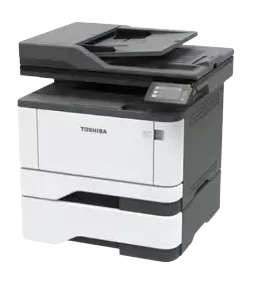

Toshiba e-STUDIO 409S

40ppm A4 Mono Multifunction Printer

The Toshiba e-STUDIO 409S prints in black and white at up to 40ppm on A4, with colour scanning and a 50-sheet duplex document feeder. Its standard 100-sheet bypass lets you keep a second approved paper stock ready for forms and occasional specialist jobs. Buy, lease or rent from Camelott®, with UK-wide service and repair support.

Toshiba e-STUDIO 409S shown. Pictured paper equipment may vary; your proposal confirms the supplied drawers and accessories.

Toshiba e-STUDIO 409S A4 monochrome multifunction printer
Camelott® Toshiba Gold Partner Buy, lease or rent · UK-wide support
40ppmA4 mono print
39ppmA4 mono copy
50 sheetsDuplex original feeder
100 sheetsStandard bypass
350 sheetsStandard total input
2.8 inchesColour touchscreen

The Toshiba e-STUDIO 409S combines 40ppm A4 mono printing, 39ppm mono copying, colour scanning and fax. Its 50-sheet duplex document feeder and standard 100-sheet bypass can help accounts, reception and admin teams handle originals and keep another approved paper ready. Available to buy, lease or rent from Camelott®, with UK-wide service and repair. The 409S has a 2.8-inch colour touchscreen and 512MB RAM; specifications for the different 409AS model must not be assumed here.

Camelott® 360° view

Mono Pages, Colour Records and a Useful Separate Paper Feed

The 409S makes sense when printed output can stay black and white, but original documents still need capturing in colour. Accounts records, signed forms and highlighted paperwork can be scanned electronically without choosing a colour print engine.

A 50-sheet duplex feeder handles document batches, while the standard 100-sheet bypass can keep an approved second print stock ready alongside the 250-sheet main drawer. The approximately 5.9-second first-print and first-copy figures are useful to assess for small walk-up jobs.

The trade-offs are a small 2.8-inch screen, 150-sheet output and a 60–90gsm automatic-duplex print range. Scan ratings need their test settings stated, and not every double-sided feeder should be described as single-pass. Faster-printing and larger-panel alternatives exist; compare the complete workflow.

Pay for functions people use

Where the 409S Helps the Working Day

Accounts and records

Keep colour in electronic documents

The scanner can retain coloured annotations and document detail even though printing and copying are mono. Check the actual file format, resolution and destination.

Original batches

Use duplex capture for two-sided records

A 50-sheet feeder supports duplex scanning. Test your originals and completed files. The checked specifications do not explicitly establish the feed mechanism as single-pass, so that claim is not made.

Paper changes

Keep another approved stock ready

The standard 100-sheet bypass can hold suitable alternative paper while ordinary stock remains in the drawer. Confirm loading limits for heavier or specialist media.

Short walk-up jobs

Check response rather than PPM alone

Approximately 5.9 seconds to the first print or copy can matter for short documents. Sleep recovery, file processing and settings affect the actual wait.

New equipment

Address wear where it causes interruptions

Unworn feed and transport parts can help compared with ageing, heavily used equipment. Paper, loading and maintenance still affect jams and reliability; no fixed reduction is guaranteed.

Software and security

Confirm the exact installation

Check current drivers, scan destinations, email authentication, private print and firmware. A current platform may have a longer remaining support horizon, but no fixed support period is promised.

Click the part you want to understand

Explore the e-STUDIO 409S Part by Part

Select an area to see the specification, what it means in practice, and when it will—or will not—make a meaningful difference.

Toshiba e-STUDIO 409S showing its main features

1. Duplex document scanning

Capture Colour Records While Printing in Mono

The 50-sheet original feeder supports simplex and duplex scanning in colour and mono.

Original capacity50 sheets; A6–A4/custom; 60–90gsm
Simplex colour / mono20 / 46ipm in UK brochure
Duplex colour / mono40 / 92ipm in UK brochure
Published scan setting150dpi in UK October 2024 brochure

Why this is useful

Double-sided invoices, signed records and annotated forms can become electronic files while routine printing stays black and white. Test the complete destination workflow, not only feeder motion.

What to weigh up

92ipm counts mono sides, not colour sheets. The European page publishes these rates at 300dpi, while the checked UK brochure says 150dpi: confirm supplied settings and finished-file time. Single-pass feed architecture is not established by these sources.

2. Controls, memory and security

A 2.8-Inch Touchscreen for Routine MFP Tasks

The colour panel provides local access to configured tasks. The 409S has 512MB RAM and no HDD listed.

Panel2.8-inch / 7.2cm colour touchscreen
RAM, standard / maximum512MB / 512MB
HDDNot fitted / not listed
Private printListed; confirm configured workflow

Why this is useful

A small touchscreen can be sufficient for repeat copies and named scan destinations. Clear setup and permissions help staff choose the right task without navigating unnecessary settings.

What to weigh up

This is not the 409AS’s 4.3-inch panel, 2GB RAM or optional 128GB ISD/TPM platform. Check authentication, firmware, network controls and data procedures; do not assume secure SSD storage or HDD-dependent scan preview.

3. Print and copy engine

40ppm Printing with Colour Scanning Kept Separate

The print and copy engine produces black-and-white pages; it does not print or copy in colour.

A4 mono print / copy40 / 39ppm
First print / first copyApproximately 5.9 seconds
Print / copy resolutionUp to 600 × 600dpi in UK brochure
Recovery from sleepApproximately 9 seconds

Why this is useful

Letters, forms and internal reports can be produced locally, with walk-up copying available where paper originals arrive. A theoretical 100-page print-engine run is 2 minutes 30 seconds before first-page and processing effects.

What to weigh up

Print PPM, copy PPM and scan IPM describe different tasks. The sleep figure is not cold-start time. Do not transfer a 1200dpi print claim from the 409AS or describe scan resolution as print resolution.

4. Bypass and media

100 Sheets of Separate Feed as Standard

The bypass is included, so an approved second print stock can be kept ready.

Standard bypass100 sheets
Bypass sizes99 × 148mm to 215 × 359mm
Bypass stock60–217gsm
Main drawer stockA6–A4/custom; 60–120gsm

Why this is useful

An approved letterhead or other regular stock can use the separate feed without repeatedly emptying the main drawer. That helps most when staff genuinely alternate papers.

What to weigh up

Special media can need smaller loads and specific settings. The 217gsm bypass limit does not apply to automatic duplex or original feeding. Confirm your exact stock, coating, size and path before ordering supplies.

5. Paper supply and duplex

350-Sheet Base Input, with Expansion to 900

The base supply combines a 250-sheet main drawer and 100-sheet bypass. An optional 550-sheet drawer takes total input to 900 sheets.

Main drawer250 sheets
Base / maximum input350 / 900 sheets
Optional drawer550 sheets; approved 60–120gsm
Automatic duplex printA4/custom; 60–90gsm

Why this is useful

Separate supplies can keep ordinary paper and another approved stock available. Extra input can reduce loading interruptions where workload justifies the added equipment.

What to weigh up

A full ream does not fit in the base main drawer. Automatic duplex printing has its own narrow stock range. The 150-sheet output tray still requires collection during longer jobs; more input does not make every run unattended.

6. Output and finishing

150-Sheet Collection for Loose-Page Jobs

The 409S collects loose sheets. No compatible inline stapler, booklet maker or automatic punch is listed.

Output tray150 sheets
Corner staplingExternal manual assembly
Booklet makerNo listed inline option
Automatic hole punchNo listed option

Why this is useful

Short reports and correspondence can be collected near the team. For occasional small packs, manual staples or punching may be proportionate.

What to weigh up

Repeated assembled packs can consume staff time. A booklet layout does not physically fold or staple sheets. Ask separately about corner staples, folded booklets and binder holes, then compare a platform accepting the required attachments.

Photocopier terminology, explained by Bean

Confused by Photocopier Jargon?

Bean explains the terms without the technical waffle. Here is what the specifications mean for your working day.

Bean, your friendly guide to photocopier terminology
Bean’s guide from Camelott®: understand what matters before paying for a higher specification.
PPM — Pages Per Minute
The rated engine output. The 409S prints A4 mono at up to 40ppm and copies at 39ppm. Processing, first-page time, duplex and paper affect actual job time.
IPM — Images Per Minute
Counts scanned sides, so a double-sided original is two images. The UK brochure lists up to 40ipm colour or 92ipm mono duplex at 150dpi. Confirm settings; the European page quotes the same rates at 300dpi.
GSM — Grams Per Square Metre
Paper weight per square metre. Main drawer: 60–120gsm; bypass: 60–217gsm; automatic duplex print: 60–90gsm. Original-feeder limits are separate.
MFP — Multifunction Printer
Combines office functions. The 409S prints and copies in mono, scans in colour or mono, and includes fax. Colour scanning does not mean colour printing.
ADF — Automatic Document Feeder
Feeds originals into the scanner. The 409S holds 50 sheets of approved A6–A4/custom originals from 60–90gsm. It is separate from blank-paper input.
DSDF — Dual Scan Document Feeder
Captures both sides in one pass. The checked 409S sources confirm duplex scanning but do not explicitly establish single-pass architecture. Do not assume this feature from an IPM figure alone.
RADF — Reversing Automatic Document Feeder
Scans one side and turns the original to capture the other. Confirm the actual mechanism when comparing scanning equipment; this page does not classify the 409S as reversing or single-pass without evidence.
DADF — Duplexing Automatic Document Feeder
An original feeder handling both sides. The 409S supports duplex original scanning. Test your batches and distinguish duplex capability from a verified single-pass design.
Duplex — Automatic Double-sided Printing
Prints both sides without manual reloading. The 409S supports approved A4/custom 60–90gsm stock. Duplex original scanning is a separate function with separate settings.
DPI — Dots Per Inch
A resolution measure. The UK brochure lists 600 × 600dpi printing. Colour scanning reaches 600 × 600dpi; the 1200 × 1200dpi mono scan figure applies via the platen with specified driver conditions, not every feeder workflow.
CPC — Cost Per Copy
A service-agreement charge per printed or copied page. Here output is mono. Ask about duplex counting, minimum billing, consumables, maintenance and exclusions; scan charges should be checked separately.
FCOT — First Copy Out Time
The first copy under stated manufacturer conditions. The 409S lists approximately 5.9 seconds. Processing, sleep state and chosen settings affect the real wait.
A4 / A3 — Paper Sizes
A4 is 210 × 297mm; A3 is 297 × 420mm. The 409S is an A4 platform. Larger originals and folded A4 booklets need suitable larger-format equipment.
Booklet Maker — Folded, Stapled Booklets
A compatible finisher folds sheets and staples along the fold. None is listed for the 409S. A software booklet layout does not physically assemble the output.
Hole Punch — Pages Ready for Binders
A compatible attachment punches printed sheets. No automatic punch is listed for the 409S. Regular binder packs may justify a machine accepting one.
Corner Staple — Keep Each Set Together
A staple near the corner holds a report together. No stapling attachment is listed for the 409S. Occasional packs need external manual assembly.

Specifications in real life

What the 409S Figures Mean in Your Office

40 / 39ppmMono print / copy

Useful when: Everyday output and walk-up copies share one device.

What to check: These are different ratings; scanning has separate IPM figures.

50 sheetsDuplex original feeder

Useful when: Regular batches of two-sided records need capture.

What to check: Confirm originals, settings and destination; single-pass design is not established here.

Colour scanMono printed output

Useful when: Annotations or colour records should remain in electronic files.

What to check: The engine still prints and copies in black and white only.

100 sheetsStandard bypass

Useful when: A supported second stock should stay ready.

What to check: Special media may need lower loading and specific settings.

2.8 inchesColour touchscreen

Useful when: Repeat local tasks need a compact interface.

What to check: Try the panel with occasional users; larger-screen alternatives exist.

90gsmAutomatic duplex maximum

Useful when: Approved ordinary office paper is printed on both sides.

What to check: The 217gsm bypass limit does not apply to the duplex path.

Compare the working day

Where the 409S Can Be the More Useful Choice

Accounts and admin

Keep colour electronically without a colour print engine

The scanner can capture coloured documents while invoices and forms print in mono. Compare the actual equipment and running-cost proposal; a universal saving is not assumed.

Paper readiness

Two standard feeds can reduce stock changes

The 250-sheet main drawer and 100-sheet bypass can keep two approved stocks ready. Comparable business MFPs can offer the same arrangement, so this is useful rather than unique.

Batch capture

A 50-sheet feeder can cover ordinary office batches

Capacity can be enough for routine case files and accounts records. Bigger or more frequent batches may justify a larger feeder or a separately verified scanning platform.

Scan comparisons

Match resolution before comparing IPM

The checked UK and European sources attach different test settings to the same 40/92ipm duplex ratings. Demonstrate your own finished files at required quality; no precise competitor speed multiplier is claimed.

Print queues

Faster mono alternatives exist

Comparable A4 multifunction models advertise 48ppm, larger screens and more optional input. If output queues are the main issue, compare complete peak jobs and installed cost.

Local tasks

Try the smaller screen with the people using it

The 2.8-inch panel can suit simple repeat tasks. A larger interface may be more useful when users need clearer job interaction, many destinations or additional applications.

Connectivity

Choose wired networking or specify the wireless option

Gigabit Ethernet and USB are listed as standard; WLAN is optional for the 409S. Confirm the fitted module and IT setup rather than assuming wireless from mobile-print support.

Finishing

Decide how staff will assemble packs

Manual staples and punching may be proportionate for occasional reports. Frequent stapled sets, folded booklets or binder packs favour equipment accepting the required finishing attachments.

Match the functions to the work

The 409S Is a Good Fit When...

It makes sense if you...

  • Mainly print and copy in black and white
  • Need colour scanning for records and annotations
  • Use routine duplex original batches within 50-sheet capacity
  • Value a standard 100-sheet bypass for approved paper
  • Can use the 2.8-inch panel comfortably
  • Use approved 60–90gsm paper for automatic duplex printing
  • Can collect output and assemble occasional packs manually

We would compare alternatives if you...

  • Need colour printed output or A3
  • Need a verified single-pass feeder specification
  • Need a larger screen or advanced apps not demonstrated
  • Need automatic duplex printing above 90gsm
  • Need inline staples, booklets or hole punching
  • Have long runs needing more speed or paper capacity
  • Require TPM, secure SSD or storage features not listed for this model

Equipment and support around your business

Buy, Lease or Rent the 409S with UK-wide Service & Repair

Buy

Specify the equipment and setup

Confirm condition, drawers, any wireless option, delivery, warranty and support. Ask for an itemised configuration and current compatibility checks.

Lease

Compare equipment and service clearly

Review payments, term, provider approval and end arrangements. Identify servicing costs separately and compare total payable.

Rent

Match the period and workload

Provide postcode, intended period, mono volumes and scan needs. We confirm suitable available equipment, condition, delivery, collection, inclusions and rental terms.

UK-wide service and repair

Support beyond supplying the machine

Camelott® handles UK-wide enquiries. Give your postcode, model, meter reading and symptoms so we can confirm coverage, charges and support available.

Make the proposal specific

Before Choosing a Toshiba 409S

Does mono output suit the work?

Confirm whether colour is needed only in scanned files or also on printed pages.

Does the scan workflow work end to end?

Test originals, resolution, both sides, file creation, permissions, email authentication and destination transfer.

Is the panel comfortable for users?

Demonstrate the 2.8-inch touchscreen and arrange clear repeat destinations.

Are the paper paths correctly specified?

Separate original feeding, main drawer, bypass and automatic-duplex print limits.

Is wireless actually included?

The 409S WLAN module is optional. Confirm fitted hardware, network policy and drivers.

Are security requirements demonstrated?

Check private print, firmware, network controls and data procedures; do not assume 409AS TPM or ISD.

How will output be collected and assembled?

Allow for 150-sheet output and manual finishing, or compare appropriate attachments on another platform.

What does the full agreement include?

Compare equipment, delivery, finance/rental terms, CPC where applicable, minimum billing, service, exclusions and total cost.

Technical specification

Toshiba e-STUDIO 409S Specifications

Specification409SWhat to know
FunctionsMono print/copy; colour/mono scan; faxNo colour printing or A3.
A4 print / copy40 / 39ppmScan IPM is separate.
First print / copyApproximately 5.9 secondsManufacturer conditions.
Recovery from sleepApproximately 9 secondsNot cold-start warm-up.
Print / copy resolutionUp to 600 × 600dpi in UK brochureDo not transfer 409AS print resolution.
Original feeder50 sheets; simplex/duplexA6–A4/custom; 60–90gsm; single-pass architecture not verified.
Simplex scan, colour / mono20 / 46ipmUK October 2024 brochure: 150dpi.
Duplex scan, colour / mono40 / 92ipmUK:150dpi; European exact-model page:300dpi. Confirm settings.
Scan resolutionColour up to 600 × 600dpiMono up to 1200 ×1200dpi via platen/network or USB TWAIN driver conditions; not every ADF workflow.
Scan formats / destinationsTIFF, JPEG, PDF, Secure PDF, PDF/A; email/USB/file/network destinations listedConfirm actual setup, drivers, authentication and software.
Main drawer250 sheets; A6–A4/customApproved 60–120gsm.
Standard bypass100 sheets99 ×148mm to 215 ×359mm;60–217gsm.
Base / maximum input350 / 900 sheetsOptional 550-sheet drawer required for maximum.
Output tray150 sheetsSeparate from input capacity.
Automatic duplex printA4/custom;60–90gsmFeed limits do not extend the duplex path.
Panel2.8-inch / 7.2cm colour touchscreenNot the 409AS4.3-inch panel.
RAM / HDD512MB standard/max; no HDDNo 409AS optional ISD or TPM assumed.
InterfacesGigabit Ethernet; USB 2.0WLAN module optional for 409S.
Mobile printingAirPrint and MopriaCompatible device/network setup required.
Printer languagesPCL5/6; PostScript 3 and PDFv 1.7 emulationConfirm exact current driver and application requirements.
SecurityPrivate print, IP/port filters, SNMPv 3, SSL/IPsec and non-volatile memory wipe listedConfirm current firmware, protocols and configured functions.
Base dimensions /weightApprox. 411 ×366 ×339mm; 12.8kgWidth ×depth ×height; drawers, doors and service clearance add space.
FinishingLoose-sheet outputNo listed stapler, booklet maker or automatic punch.

Checked against Toshiba’s UK October 2024 family brochure and exact-model European specifications. Scan test settings differ between those sources and are identified above. Confirm the supplied equipment, required resolution, approved stock and current software. Rated figures are not complete workflow guarantees.

Questions worth asking

Toshiba 409S Questions Answered

Does the 409S print in colour?

No. It prints and copies in mono. It can scan colour originals into electronic files.

Can I buy, lease or rent it?

Ask Camelott® for available equipment and configuration. We confirm condition, availability, finance approval where applicable, delivery, support and agreed terms.

Do you offer UK-wide service and repair?

Yes. Provide your postcode, model, meter reading, error codes and symptoms so we can confirm coverage, charges and support available.

How fast are printing and copying?

Up to 40ppm A4 mono print and 39ppm mono copy. First print and first copy are approximately 5.9 seconds under manufacturer conditions.

Does it scan both sides automatically?

The 50-sheet document feeder supports duplex scanning. The checked sources do not explicitly establish its feed mechanism as single-pass, so that architecture is not claimed here.

Is 92ipm the colour scan speed?

No. The duplex ratings are 40ipm colour and 92ipm mono. IPM counts sides, not sheets. The UK October 2024 brochure quotes 150dpi;the European page quotes 300dpi, so confirm settings and actual finished-file performance.

How large is the touchscreen?

The 409S has a 2.8-inch/7.2cm colour touchscreen. The 4.3-inch panel belongs to the different 409AS model.

How much memory and storage are included?

The 409S lists 512MB RAM standard and maximum, with no HDD. Do not assume the 409AS’s 2GB RAM, optional 128GB ISD or TPM.

Is wireless standard?

No. Toshiba lists a WLAN module as optional for 409S. Gigabit Ethernet and USB 2.0 are standard interfaces. Confirm the installed equipment.

How much paper is included?

A 250-sheet main drawer and 100-sheet bypass give 350-sheet base input. An optional 550-sheet drawer raises the maximum to 900.

Can heavy paper print double-sided?

Automatic duplex print supports approved A4/custom 60–90gsm stock. Main drawer 60–120gsm, bypass 60–217gsm and original-feeder limits are separate.

Can it make searchable PDFs or scan directly to a particular cloud service?

Confirm the exact application, licence, driver and destination workflow. Do not assume OCR, SharePoint connectors or HDD-dependent scan preview from a family brochure feature belonging to another model.

Does it include a secure SSD or TPM?

Neither is listed for 409S in the checked specifications. Security should be assessed through actual authentication, private print, firmware, network controls and data-erasure procedures.

Why can newer storage platforms matter?

Flash storage can improve storage access and removes mechanical disk parts. Security depends on encryption, key protection, access controls and erasure;flash is not inherently safer than an encrypted HDD. These storage upgrades are not listed for 409S.

Can it staple, make booklets or punch holes?

No compatible inline attachment is listed. Plan external manual assembly for occasional packs or compare equipment accepting the finishing tools you need.

Will new equipment reduce jams and extend support?

Unworn parts can help compared with heavily worn equipment, and a current platform may have a longer remaining support horizon. No fixed reduction in faults or driver-support period is guaranteed.

Interested in the 409S?

Need Mono Output and Colour Document Capture?

Tell Camelott® your users, mono volumes, scan batches, paper types and finishing needs. We will explain a suitable 409S configuration, buying, leasing or rental options, and UK-wide service and repair support.

Camelott®

How can we help?

Request a quote or ask for information about the Toshiba 409S.

We’ll use your details to respond to your enquiry.

Scroll to Top
Call Now Button