
Toshiba e-STUDIO 331AC
33ppm A4 Colour Multifunction Printer
Compact A4 colour printing at 33ppm, with a standard single-pass scan feeder and built-in OCR. Available to buy, lease or rent from Camelott®, with UK-wide service and repair support.
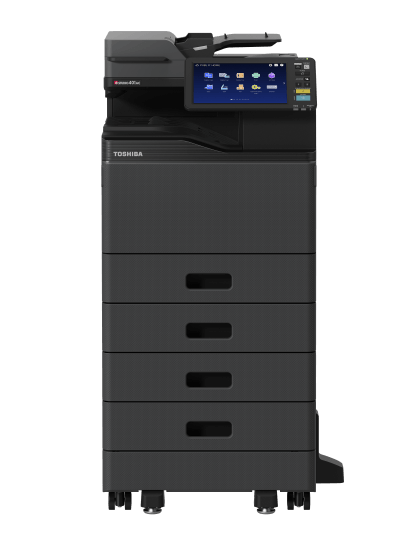
The Toshiba e-STUDIO 331AC is a 33ppm A4 colour multifunction printer, photocopier and scanner. It can suit a lighter working day of shorter A4 jobs while retaining a standard 100-sheet single-pass feeder, embedded OCR and Toshiba’s e-BRIDGE Next platform. This Toshiba 331AC photocopier provides 650-sheet standard paper input and supports approved media up to 256gsm through the cassette and automatic duplex path. Available to buy, lease or rent from Camelott®, with UK-wide service and repair. *Duplex scanning is rated up to 80ipm colour or 116ipm mono at 300dpi. The shared 331AC/401AC range photograph shows optional extra drawers and a floor-standing configuration; confirm the equipment supplied.
Camelott® 360° view
Toshiba 331AC: A4 Printing Without Making Scanning an Afterthought
A sensible starting point when you do not need A3, inline booklet making or automatic hole punching. The 331AC combines 33ppm A4 colour output with a standard single-pass feeder and embedded OCR. For shorter office jobs, forms, correspondence and document capture, that can be more useful than paying for a larger A3 platform you rarely use.
The 550-sheet main drawer holds a full ream with room left over, and the 100-sheet bypass brings standard input to 650 sheets. Suitable heavier stock can be printed and automatically duplexed up to 256gsm, subject to media and size restrictions. Some comparable A4 configurations have a 250-sheet main drawer or lower duplex weight limits, so compare the actual paper paths as well as speed.
Compact A4 does not automatically mean lower total cost or lower duty capacity. Compare the complete supplied price, service rates and expected workload. If substantial print queues, A3 sheets, folded booklets or automatically punched packs are regular requirements—or likely future needs—choose a configuration that supports them from the outset.
Click the part you want to understand
Explore the e-STUDIO 331AC Part by Part
Select an area to see the specification, what it means in practice, and when it will—or will not—make a meaningful difference.
1. Document feeder & scanning
Single-Pass Scanning Is Included
The standard 100-sheet DSDF captures both sides of an original in one pass. You do not need to choose an optional larger A3 feeder to obtain this mechanism.
Why this is useful
For invoices, signed forms and double-sided records, single-pass capture avoids reversing each sheet. Embedded OCR can make scanned documents searchable. This can suit a business with modest printing but regular document capture; agree the file format, destination and OCR setup during installation.
What to weigh up
Single-pass feeding is also standard on other A4 machines. The 116ipm figure is monochrome, not colour, and is a count of scanned sides. Original condition, loading, OCR, processing and upload still affect the complete job. Do not promise fewer jams or faster finished files from the feeder type alone.
2. Touchscreen & workflow
Keep Familiar Workflows in a Smaller A4 Setup
The 10.1-inch multi-touch panel uses Toshiba e-BRIDGE Next, the platform also used across Toshiba’s larger office systems.
Why this is useful
Saved destinations and templates can help staff repeat accounts scans, confidential prints and routine copies without remembering every setting. A familiar interface can also help where the office already uses other Toshiba devices. Compatible cloud apps can extend supported workflows.
What to weigh up
A bigger screen only helps if the setup is clear. Some comparable A4 devices use smaller touch panels and may still cover simple tasks. Confirm current cloud-app availability, licences and account permissions. Embedded OCR does not mean every advanced Zone OCR or cloud workflow is included.
3. Print engine
33ppm A4: Useful Everyday Output
The 331AC prints and copies A4 at up to 33ppm in colour and monochrome. It does not print or copy A3 sheets.
Why this is useful
For letters, forms and shorter shared-office documents, the useful combination is a suitable engine speed and the right functions around it. A theoretical 100-page A4 engine run takes about 3 minutes 2 seconds. On a ten-page job, a nearby 35ppm engine saves only about one second of engine time.
What to weigh up
These are separate manufacturer measurements, not a guaranteed PC-to-first-print time. Processing, sleep state, media and duplex settings affect the job. If long batches repeatedly occupy the machine, compare a faster configuration, its supported workload, paper capacity and service cost.
4. Bypass & media
Handle Occasional Stock Without Emptying the Main Drawer
The 100-sheet bypass provides a separate path for suitable smaller media, envelopes and banner work within the published limits.
Why this is useful
An occasional envelope, cover or suitable long notice can be handled without replacing the ordinary paper in the main drawer. Banner capability offers a narrow, long format for appropriate signage; it does not turn the device into an A3 printer.
What to weigh up
The 256gsm limit is lower than the 300gsm capability of some larger A3 configurations. Banner stock has its own weight range. Confirm the exact paper, envelope and size combination, settings and manual handling before relying on a specialist job.
5. Paper input
A Full-Ream Drawer Before Adding Extra Capacity
One 550-sheet main cassette and a 100-sheet bypass provide 650-sheet standard input. Optional feeding equipment increases capacity.
Why this is useful
A full ream can be loaded without needing to wait for the drawer to empty completely. Additional drawers can keep letterhead or another approved stock ready. The 256gsm duplex specification may be useful against A4 configurations with lower double-sided paper-weight limits.
What to weigh up
650 sheets includes the bypass; the ordinary main drawer holds 550. A maximum of 3,200 sheets needs the right accessories and supports particular sizes. Add capacity for genuine reloads or stock changes. Check the installed footprint, supported workload and output collection too.
6. Output & finishing
An Offline Stapler Is Different from Inline Finishing
The output tray collects loose sheets. Toshiba lists an optional offline stapler for this model, rather than an automatic inline booklet or hole-punch system.
Why this is useful
For occasional short reports, collecting the pages and using a separate or offline stapler may be proportionate. This avoids paying for a larger finishing platform when staff rarely assemble document sets. The pictured numbered area identifies the output side, not an installed booklet attachment.
What to weigh up
An offline stapler requires staff to handle the printed pack; it does not automatically staple each set as it leaves the printer. If repeated corner-stapled sets, folded booklets or punched binder packs are needed now or later, choose a machine with the appropriate compatible inline accessories.
Photocopier terminology, explained by Bean
Confused by Photocopier Jargon?
Bean explains the terms without the technical waffle. Here is what the specifications mean for your working day.

- PPM — Pages Per Minute
- Printer PPM measures pages produced per minute once the print engine is running, under specified test conditions. The difference between 33ppm and 45ppm matters much more on a 100-page job than a five-page job, where processing and the first page account for more of the wait.
- IPM — Images Per Minute
- Scanner IPM normally measures scanned sides, not sheets. One double-sided sheet counts as two images. A high figure helps with large scan batches, but resolution, OCR, file processing and upload speed can still slow the complete job.
- GSM — Grams Per Square Metre
- GSM describes paper weight per square metre; ordinary office paper is often 80gsm. Support for heavier paper can help with covers and certificates. This model supports approved media up to 256gsm through the main cassette and automatic duplex path. Check supported sizes and media types; paper weight does not describe scan-original limits.
- MFP — Multifunction Printer
- One device combines printing, copying and scanning; fax may be optional. Sharing an MFP saves space, but a busy scan or copy session can create a queue, so consider how many people need it at once.
- ADF — Automatic Document Feeder
- An ADF feeds a stack of originals into the scanner, saving you from placing every page on the glass. Capacity matters for long batches. ADF alone does not tell you whether both sides are scanned automatically; check the feeder type.
- DSDF — Dual Scan Document Feeder
- A DSDF scans both sides of an original in one pass, without turning the sheet over. It is especially useful for large double-sided document packs. The 331AC includes a 100-sheet DSDF as standard. Its duplex scan ratings are up to 80ipm colour and 116ipm mono at 300dpi.
- RADF — Reversing Automatic Document Feeder
- A RADF scans one side and reverses the sheet to scan the other. It still handles double-sided originals automatically, but the reversing step makes it slower than a dual-scan feeder. It can be quite sufficient for occasional smaller batches. The 331AC uses a single-pass DSDF, rather than a reversing feeder.
- DADF — Duplexing Automatic Document Feeder
- DADF describes an automatic feeder that handles double-sided originals. Check whether the actual configuration scans both sides in one pass or reverses each sheet: the mechanism, scan speed and capacity matter more than the initials. A standard single-pass feeder can offer good value when it handles your normal batches without an upgrade.
- Duplex — Automatic Double-sided Printing
- Automatic duplex prints on both sides without manually reloading the paper. It saves paper and reduces bulky packs. It does not mean double-sided scanning, and supported paper weights can be lower than for single-sided printing.
- DPI — Dots Per Inch
- DPI describes resolution: how many dots are printed, or how finely a scan samples detail, per inch. Higher settings can help fine text and images, but scanning at higher resolution creates larger files and can slow the workflow. Match the setting to the task.
- CPC — Cost Per Copy
- CPC is the charge per copy or printed page under a service arrangement, normally with different rates for mono and colour. Ask what is included, how A3 and double-sided pages are counted, and whether minimum billing applies. Compare the rates against your actual usage.
- FCOT — First Copy Out Time
- FCOT is the time to produce the first copy under the manufacturer’s test conditions. It is not PC-to-first-printed-page time: a PC print job can also involve the computer, application, driver, network, server or cloud, copier processing and print engine. Sleep state can add a further wait.
- A4 / A3 — Paper Sizes
- A4 is 210 × 297mm, the usual office page. A3 is 297 × 420mm, twice the area of A4, useful for plans, larger spreadsheets and folded A4 booklets with suitable finishing. If you never use A3, a smaller A4 device may suit a lighter workload, but check paper capacity, sustained use and any finishing attachments you may need later.
- Booklet Maker — Folded, Stapled Booklets
- A booklet maker folds sheets down the middle and staples along the fold to produce a finished booklet. With suitable paper and finishing, A3 sheets become an A4 booklet and A4 sheets become an A5 booklet. Useful for handbooks, programmes and training guides. It is a separate finishing requirement from corner stapling: the 331AC does not offer an inline booklet maker, so choose a compatible finishing platform if this is a regular or likely future need.
- Hole Punch — Pages Ready for Binders
- A compatible hole-punch option makes holes in printed sheets so packs are ready for folders or ring binders, saving staff from punching each batch by hand. Check the hole pattern, supported paper sizes and weights, and the required finisher combination. If you regularly prepare binder packs—or expect to later—choose a machine that accepts the necessary attachment. The 331AC does not offer an automatic inline hole-punch option.
- Corner Staple — Keep Each Set Together
- Corner stapling puts a staple near the corner of each printed set, keeping meeting papers, reports and teaching packs together. It can save time when you repeatedly produce multiple sets; for an occasional short document, a separate stapler may be sufficient. Check the compatible finisher’s sheet limit and staple positions. Corner stapling does not fold pages or make a booklet. The 331AC’s optional offline stapler requires staff to handle the pages; it does not automatically staple the print run.
Specifications in real life
What the 331AC Figures Mean in Your Office
Its appeal is the complete A4 setup: useful paper capacity, included single-pass scanning and familiar workflows without buying functions you do not need.
Useful when: Shorter reports, forms and correspondence make up the usual print day.
What to check: 100 A4 pages represent about 3 minutes 2 seconds of engine time. Processing, the first page, media and duplex settings add to the full job.
Useful when: Staff regularly capture double-sided originals in batches.
What to check: Capacity counts sheets; scan speeds count sides. Other A4 machines also include single-pass feeders, so compare finished-file time and supplied cost.
Useful when: You want to match scan settings to colour documents or monochrome records.
What to check: These figures are at 300dpi. 116ipm is not a colour rating. At higher colour resolution, the published scan speed is lower.
Useful when: A full-ream main drawer plus a separate bypass suits everyday office use.
What to check: The total is 550 sheets in the cassette plus 100 in the bypass. Optional maximum capacity is 3,200 sheets.
Useful when: Approved heavier stock is used for double-sided covers or other suitable documents.
What to check: Check paper sizes, types and settings. Banner media has a separate 90–163gsm range; this is not 300gsm support.
Useful when: You want A4 functions in a smaller footprint than an expandable A3 configuration.
What to check: The base is around 53kg and 634mm high. Extra drawers, a stand, doors and working access need additional space; assess the actual supporting surface.
Think about the whole working day
Where the 331AC Could Be the More Sensible Choice
Choose it for the work it covers well, and check whether larger paper or automatic finishing would genuinely earn their place.
Avoid paying for paper size you never use
For shorter A4 jobs without inline finishing, a compact configuration may reduce equipment cost and space requirements. Compare the actual purchase, lease or rental proposal and service rates; an A4 label alone does not guarantee the lowest overall cost.
Modest printing can still deserve useful scanning
The standard 100-sheet DSDF captures both sides in one pass. That is useful when accounts records, signed forms or personnel files need scanning even though printing is modest. Correct loading, suitable originals and maintenance remain important.
Embedded OCR can make records easier to find
OCR recognises text in a scan so supported files can be searched. That can make invoices and correspondence easier to retrieve. Agree the supported output format and test your own originals; handwriting, poor copies and layouts can affect recognition.
A 550-sheet drawer holds a full ream
Some comparable A4 configurations provide a 250-sheet standard drawer. Here, the 550-sheet cassette can reduce reloads when several users share everyday A4 stock. The additional 100-sheet bypass is separate from the ordinary drawer.
Check the duplex path, not just the bypass headline
The 331AC supports approved 60–256gsm media through automatic duplex. Some comparable A4 configurations stop at a lower double-sided weight. This can matter for suitable heavier documents, but confirm your exact stock and supported sizes first.
A small speed difference may save very little
The theoretical difference between 33ppm and 35ppm is about ten seconds over 100 A4 pages and around one second over ten pages. Paper handling, processing and collecting the document can matter more for short jobs. Choose extra speed for a real recurring queue.
Keep a common approach across the office
The 10.1-inch panel and e-BRIDGE Next platform can help staff moving between compatible Toshiba devices. Saved templates and agreed destinations can reduce repeated setup. The benefit comes from configuration and training, rather than the screen size alone.
A separate staple may be enough until packs become routine
The optional offline stapler still needs someone to handle the printed pages. For occasional reports that may be sufficient. Repeated automatically stapled sets, folded booklets or punched binder packs need a different compatible finishing platform.
Compact does not mean lightweight
The base dimensions are 520 × 540 × 634mm and the published weight is about 53kg. Check the supporting surface, delivery route, door access and selected stand or drawers. The range photograph shows a taller optional configuration.
Decide what the next few years will require
If A3 sheets, booklets or automatic punching are likely, check those needs before committing to this A4 platform. For sustained longer runs, agree recommended use and peak batches and compare an expandable configuration with suitable paper handling and support.
Match the functions to the work
The 331AC Is a Good Fit When...
It makes sense if you...
- Mainly use A4 and do not need A3 print or copy output
- Produce shorter colour and mono office jobs
- Want standard single-pass capture of double-sided originals
- Need embedded OCR and supported document destinations
- Value a 550-sheet main drawer and a separate bypass
- Can use a separate or offline stapler for occasional documents
- Can match the supplied equipment and service to expected use
We would look at something else if you...
- Need A3 sheets for printing, copying or scanning
- Regularly need automatically stapled sets or folded booklets
- Prepare punched binder packs and want inline punching
- Expect 300gsm stock support
- Need more scan capacity than a 100-sheet feeder will hold
- Have repeated long print queues that justify a different configuration
- Cannot provide suitable support, access or space for the installed equipment
Equipment and support around your business
Buy, Lease or Rent the 331AC with UK-wide Service & Repair
Choose how you obtain the machine, then agree the support that keeps it useful in your workplace. We explain equipment costs and service terms separately.
Purchase the configuration you need
Buy a Toshiba e-STUDIO 331AC outright, with the feeder, paper capacity and finishing selected for your work. Ask about available new and professionally prepared used equipment, the supplied condition, warranty and service options.
Spread the equipment cost
A lease can spread the equipment cost over an agreed term. We explain the payments, term and end-of-agreement arrangements, with service charges shown separately. Finance is subject to the provider’s approval and agreed terms.
Discuss a rental for your circumstances
Rent the 331AC where the available equipment and rental arrangement suit your requirements. Tell us the intended period, location, expected use and finishing needs so we can confirm availability, delivery, collection and the applicable terms.
Support beyond supplying the machine
Camelott® offers photocopier servicing and repair across the UK, including support for the Toshiba e-STUDIO 331AC. Tell us your postcode and whether you need ongoing maintenance or help with a fault. We will confirm the service available, charges, inclusions and attendance arrangements for your location.
Make the proposal specific
Before Choosing a Toshiba 331AC
Confirm the supplied configuration and use your own documents to check the useful benefits.
Do you need A3 now or later?
The 331AC is an A4 platform. Confirm the largest originals and printed pages, including plans, spreadsheets and folded A4 booklets. Banner support is a different format, not A3 capability.
What happens after printing?
Separate occasional hand stapling from automatically stapled sets, folded booklets and hole punching. This model lists an offline stapler; it does not offer those inline finishing systems.
How do your own originals scan?
Test double-sided documents through the standard 100-sheet DSDF. Compare colour and mono rates at matching settings and include OCR, file creation and upload time.
Which OCR and destination setup is supplied?
Embedded OCR is included, but advanced apps and cloud workflows may require licences or configuration. Confirm searchable-file formats, folder permissions and account requirements.
What paper should remain loaded?
The standard drawer holds 550 sheets and the bypass 100. Add drawers or a large-capacity feeder only when they solve actual loading or stock-change tasks. Confirm supported sizes.
Are heavier stocks suitable for the whole path?
Cassette and automatic duplex support 60–256gsm; the bypass supports 52–256gsm. Banner paper has separate limits. Test the actual stock and do not assume 300gsm support.
What are the complete equipment and service costs?
Compare purchase, lease or rental terms, condition, warranty, accessories and mono/colour CPC rates against real usage. Camelott® does not use minimum billing as standard and normally recommends finance terms of no more than five years.
Will the installation and workload suit the machine?
Allow for the supporting surface or stand, delivery route, optional drawers, loading and working access. Agree normal monthly use, peak jobs, service coverage and inclusions. Do not infer duty capacity from A4 size or the 33ppm rating alone.
Technical specification
Toshiba e-STUDIO 331AC Specifications
Published speeds are maximum figures under stated conditions. Standard features and optional equipment are separated.
| Specification | 331AC | What to know |
|---|---|---|
| Device type | A4 colour multifunction system | Print, copy and scan; fax is optional. No A3 output. |
| A4 print / copy speed | Up to 33ppm colour / mono | A4 rating; not the 35ppm Letter figure used in some overseas material. |
| First copy output | Approx. 7.2s colour / 5.7s mono | Copy test figures; separate from PC-to-first-print time. |
| Low-power recovery | Approx. 18 seconds | Power-on warm-up and first-copy timings are separate. |
| Document feeder | Standard 100-sheet DSDF | Single-pass capture of both sides of the original. |
| Duplex colour scanning | Up to 80ipm at 300dpi | Scanned sides per minute; higher colour resolutions reduce speed. |
| Duplex mono scanning | Up to 116ipm at 300dpi | The 116ipm figure is not a colour rating. |
| Maximum scan resolution | 600 × 600 dpi | Resolution and scan-speed test conditions are separate. |
| OCR | Embedded OCR | Advanced Zone OCR and connected workflows may need additional apps or licences. |
| Standard paper input | 650 sheets | 550-sheet cassette plus 100-sheet bypass. |
| Maximum paper input | 3,200 sheets | Requires compatible optional feeding equipment. |
| Main cassette | A5–A4; 60–256gsm | 550 sheets under stated conditions; approved media and sizes apply. |
| Bypass | 98 × 148mm to A4; 52–256gsm | 100 sheets; supported media and size combinations apply. |
| Banner media | Up to 215.9 × 1,321mm; 90–163gsm | Long narrow format, not A3. Separate loading and media restrictions apply. |
| Automatic duplex | A5–A4; 60–256gsm | Automatic double-sided printing is separate from duplex scanning. |
| Print resolution | 600 × 600 dpi; 1200 × 1200 dpi mode | 1200 × 1200 dpi requires the PostScript driver. |
| Control panel / platform | 10.1-inch colour multi-touch; e-BRIDGE Next | Templates and connected workflows depend on setup. |
| RAM / storage | 4GB RAM / 256GB secure SSD | Available formatted storage is lower than nominal. |
| Connectivity | Gigabit Ethernet, USB 2.0; wireless options | WLAN, Bluetooth and Wi-Fi Direct need the appropriate option. |
| Base dimensions / weight | 520 × 540 × 634mm; approximately 53kg | Width × depth × height. Optional drawers, stand and working access add space. |
| Standard output | 250 sheets | Plan collection for larger runs and the actual paper stock. |
| Finishing | Optional MJ-1047 offline stapler | Requires manual handling. No listed inline booklet maker or automatic punch. |
Sources: Toshiba 331AC specification and accessories, Toshiba European series brochure and Toshiba equipment specifications. UK A4 output is 33ppm; some overseas material quotes Letter speed. Capacities normally relate to A4 80gsm unless stated otherwise. Confirm current media, accessory and software combinations.
Comparison context: published specifications for comparable A4 equipment show different standard drawers, duplex weight limits and OCR options. Other A4 devices also include single-pass feeders. These are specific configuration comparisons, not claims of overall superiority or guaranteed savings.
Questions worth asking
Toshiba 331AC FAQ
Can I buy, lease or rent the Toshiba e-STUDIO 331AC?
Yes. Camelott® offers purchase, lease and rental options. Tell us your location, expected use and intended period so we can confirm suitable equipment, availability and terms. Equipment and service costs are explained separately.
Do you provide UK-wide service and repair?
Yes. Camelott® offers photocopier servicing and repair across the UK, including support for the Toshiba 331AC. Provide your postcode, machine details and any fault information so we can confirm coverage, charges, inclusions and attendance arrangements.
Who is the 331AC best suited to?
An office using A4 documents, shorter colour and mono jobs and regular scanning, without needing A3 or inline booklet and punch finishing. Match the actual configuration and service arrangement to normal monthly use and peak jobs.
Is the UK print speed 33ppm or 35ppm?
The A4 rating is up to 33ppm in colour and mono. Some overseas material quotes up to 35ppm on Letter paper. Different paper sizes should not be treated as the same test.
Is the single-pass document feeder included?
Yes. The 331AC has a standard 100-sheet DSDF, capturing both sides in one pass. Capacity counts sheets; duplex scan-speed figures count scanned sides.
Does it scan colour at 116ipm?
No. At 300dpi duplex, the published maximum is 80ipm colour and 116ipm monochrome. Higher-resolution colour scanning is slower. OCR, file processing and upload affect the completed document time.
Does it include OCR?
Toshiba lists embedded OCR for the 331AC. Confirm the searchable-file format and workflow configured for your documents. Advanced Zone OCR or cloud apps may require additional licensing and setup.
Can it print, copy or scan A3?
No. This is an A4 platform. The supported narrow banner format is different from A3. If larger originals or sheets are needed, choose an appropriate A3 device.
Can it print heavier paper double-sided?
Automatic duplex and the main cassette support approved media from 60–256gsm within supported sizes. The bypass supports 52–256gsm. Check the exact stock and settings; this is not 300gsm support.
Can it automatically staple, make booklets or punch holes?
Toshiba lists an optional offline stapler. Staff still handle the printed set, so it is different from automatic inline stapling. This model does not list an inline booklet maker or automatic hole punch. Choose a compatible finishing platform if those functions matter.
How much paper does it hold?
Standard input is 650 sheets: a 550-sheet main cassette and a 100-sheet bypass. Up to 3,200 sheets is possible with the correct optional feeding equipment; it is not the standard configuration.
Is A4 always less expensive than A3?
No. A compact A4 setup may reduce cost and space when it covers your actual jobs, but compare equipment price, service rates, accessories and expected use. Buying a smaller device that cannot handle required finishing may cost more to replace later.
Is it suitable for long print runs?
It can print batches, but sustained queues should be assessed using typical jobs, expected monthly use, paper supply and output collection. A faster or more expandable configuration may suit repeated long runs better. No duty capacity should be assumed from paper size alone.
Can it connect to Microsoft and Google workflows?
Compatible e-BRIDGE apps can support connected workflows. Confirm the current app, licence, account permissions and actual destination setup. Standard network printing or scan-to-email does not mean every cloud connector is included.
What affects the full purchase, lease or rental price?
Condition, stand, extra drawers, software, delivery, finance term or rental period and service affect the complete cost. Ask for a proposal naming the supplied configuration, mono and colour CPC rates where applicable, inclusions and terms.
Interested in the 331AC?
Talk to Camelott® About the Toshiba 331AC
Buy, lease or rent the Toshiba e-STUDIO 331AC from Camelott®, with UK-wide service and repair support. Tell us your postcode, A4 print workload, scanning needs and preferred arrangement. We will check whether this compact setup covers the work and explain equipment, delivery and service costs clearly.