
Toshiba e-STUDIO 339CS
33ppm A4 Colour Multifunction Printer
The Toshiba e-STUDIO 339CS prints and copies in colour or black and white at up to 33ppm on A4. Its included 100-sheet single-pass feeder suits teams scanning two-sided invoices, forms and customer records, while TPM hardware helps protect cryptographic keys. Available to buy, lease or rent from Camelott®, with UK-wide service and repair support.
Toshiba e-STUDIO 339CS shown. Confirm the accessories and configuration included in your proposal.
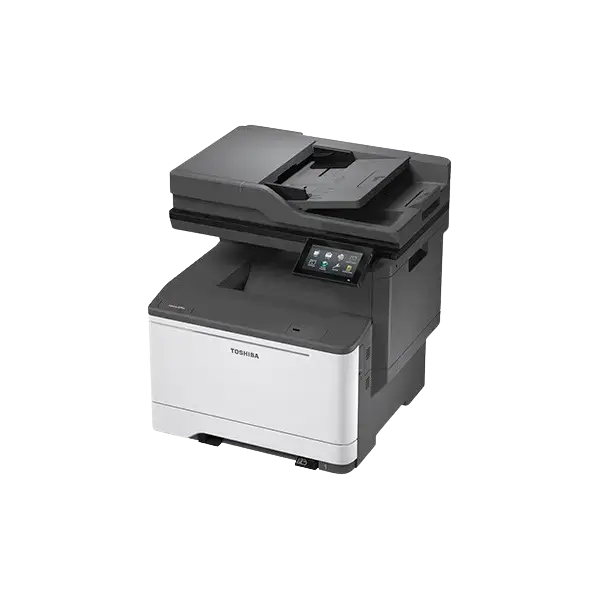

The Toshiba e-STUDIO 339CS is a 33ppm A4 colour multifunction printer, copier, scanner and fax. Its standard 100-sheet single-pass document feeder can make it useful where scanning matters more than buying a faster print engine. TPM security adds dedicated hardware for cryptographic keys. Available to buy, lease or rent from Camelott®, with UK-wide service and repair. *Duplex scanning is rated up to 68ipm colour and 98ipm mono at 300 × 600dpi. Storage and searchable-file options depend on the supplied configuration.
Camelott® 360° view
A4 Printing with More Attention to Scanning and Security
A useful match when everyday printing fits on A4 but double-sided records arrive in substantial batches. The 339CS keeps its print engine at 33ppm and includes a 100-sheet dual-scan feeder. Both sides are captured in one pass, helping with invoices, signed forms and case records without choosing an A3 chassis solely for scanning.
TPM stores cryptographic keys on dedicated hardware separate from document storage. That is a specific security feature, not a reason to assume every storage option or workflow licence is included. The optional 128GB Intelligent Storage Device is separate from the standard 2GB RAM.
The main compromises are paper loading and finishing. The ordinary drawer holds 250 sheets, the manual slot takes one sheet, and automatic duplex is limited to approved 60–105gsm stock. Choose an appropriate alternative if you need a full-ream standard drawer, A3 originals, automatic booklets or hole punching.
Pay for useful improvements
Where the 339CS Changes the Working Day
The most useful gains depend on your present machine and the tasks staff repeat.
Capture both sides without reversing each original
Compared with the earlier 338CS’s 50-sheet reversing feeder, the 339CS doubles original capacity and uses a single-pass design. Their scan test settings differ, so test your records rather than quoting a precise speed multiplier.
Keep cryptographic keys separate from document data
TPM provides dedicated hardware for key protection and system security functions. Combine it with appropriate authentication, firmware and network permissions. Optional storage encryption and disposal procedures still need checking.
Specify the installed equipment clearly
The 128GB Intelligent Storage Device is optional on the 339CS. Do not assume a standard 256GB secure SSD or embedded OCR from a different Toshiba family. Searchable PDF and RTF are optional workflows in the published specification.
Start with unworn feeding and transport components
A new machine can reduce wear-related issues compared with an ageing, heavily used unit. Correct stock, loading and maintenance still matter. No fixed reduction in jams or breakdowns is guaranteed.
Check the actual systems your office uses
A current platform may offer a longer remaining support horizon than older equipment, but no fixed period is promised. Confirm your OS, current drivers, scan destinations, email authentication and firmware.
Do not overlook paper and finishing limits
The 339CS remains an A4 device with a 250-sheet main drawer and 105gsm automatic-duplex limit. For A3 or repeated automatic finishing, discuss a compatible larger platform. A faster scanner does not remove those limits.
If you are reviewing an existing older device, compare its condition and repair costs with the full replacement proposal. A suitable repair can still be the right decision.
Click the part you want to understand
Explore the e-STUDIO 339CS Part by Part
Select an area to see the specification, what it means in practice, and when it will—or will not—make a meaningful difference.
1. Single-pass document scanning
100 Originals, Both Sides in One Pass
The standard dual-scan feeder captures both sides simultaneously. It is a useful feature even where A4 printing demand is modest.
Why this is useful
Accounts teams, administrators and shared offices can capture double-sided records without the feeder reversing each sheet. The 100-sheet capacity can also reduce splitting a long original stack into smaller batches.
What to weigh up
98ipm is the mono rating, not colour. Finished-file time also includes OCR where specified, processing and upload. Check original condition, paper limits and destination permissions.
2. Controls & security
A 4.3-Inch Touchscreen and Dedicated TPM Hardware
The 339CS uses a tilting colour touchscreen. Its TPM stores cryptographic keys on dedicated hardware separate from the storage holding document data.
Why this is useful
A dedicated key-protection component is relevant where the office handles staff, financial or customer records. Named destinations, user controls and private print can also help staff use the agreed workflow.
What to weigh up
TPM does not make configuration unnecessary. Check authentication, firmware, network rules and secure end-of-use erasure. The optional ISD is not an increase in RAM, and searchable-file functions or connected apps may require additional options.
3. Print and copy engine
33ppm A4: Look at the Whole Job
The 339CS prints and copies A4 at up to 33ppm in colour and mono. Fax is included; A3 is not supported.
Why this is useful
For correspondence, forms and shorter reports, first-page response and a useful scan setup can matter more than a small PPM difference. A theoretical 100-page run at 33ppm is about 3 minutes 2 seconds before processing and other delays.
What to weigh up
First-print and first-copy figures measure different tasks. Sleep state, application, network, media and duplex settings affect the complete job. For repeated long queues, compare a faster configuration with suitable paper capacity and support.
4. Manual feed & media
Separate Main-Feed and Duplex Paper Limits
The standard manual slot takes one sheet. The UK brochure lists approved main-cassette and manual-feed stock up to 218gsm; optional drawers have their own limits.
Why this is useful
An occasional supported envelope or special sheet can be handled without emptying the ordinary drawer. Keeping feed paths separate can make stock changes easier to manage.
What to weigh up
Some regional model pages quote 216gsm rather than 218gsm. Confirm the supplied machine’s approved media; neither figure is the automatic-duplex limit. The optional Duo-drawer’s 100-sheet bypass is not standard equipment.
5. Paper supply
Start with 250 Sheets, Add Capacity for a Reason
The standard drawer holds 250 sheets and the manual slot one. Maximum input of 2,001 sheets requires the appropriate optional feeding equipment.
Why this is useful
Extra drawers can keep letterhead or another approved stock ready and reduce routine loading. A Duo-drawer adds a 550-sheet cassette and 100-sheet multipurpose supply when that solves actual work.
What to weigh up
The standard drawer does not hold a full ream. Maximum capacity needs a specific accessory combination and more space; do not assume it is supplied. Check the stock limits of optional trays separately from the base cassette.
6. Output & finishing
200-Sheet Output, with an Optional Convenience Stapler
The output tray collects loose sheets. A convenience stapler is optional; staff still handle the pages to use it.
Why this is useful
For occasional reports, a conveniently mounted stapler can be enough without buying a larger finishing platform. The 200-sheet output capacity provides room for completed A4 jobs under stated conditions.
What to weigh up
A convenience stapler does not automatically staple each print set, fold booklets or punch binder packs. For repeated finished documents, choose a machine accepting the necessary inline attachments.
Photocopier terminology, explained by Bean
Confused by Photocopier Jargon?
Bean explains the terms without the technical waffle. Here is what the specifications mean for your working day.

- PPM — Pages Per Minute
- The engine’s page rate under stated conditions. The 339CS is rated at 33ppm A4 colour and mono. Processing, the first page, paper and duplex settings affect the finished job.
- IPM — Images Per Minute
- Scanner IPM counts sides. One double-sided original is two images. At 300 × 600dpi, the 339CS rates up to 68ipm colour or 98ipm mono duplex; file processing and upload add time.
- GSM — Grams Per Square Metre
- Paper weight per square metre. UK base-feed specifications reach 218gsm, but automatic duplex is limited to 60–105gsm. Optional trays and scan originals have different limits.
- MFP — Multifunction Printer
- One machine combines print, copy and scan functions; the 339CS also includes fax. Consider which tasks several staff may need at once.
- ADF — Automatic Document Feeder
- Feeds a stack of originals into the scanner. The 339CS holds 100 sheets; supported original sizes, condition and weight still matter.
- DSDF — Dual Scan Document Feeder
- Captures both sides in one pass without reversing the original. The 339CS includes this design as standard, useful for double-sided accounts records, signed forms and case files.
- RADF — Reversing Automatic Document Feeder
- Scans one side, then reverses the sheet for the other. The 339CS uses a dual-scan feeder instead. Compare actual speeds at matching settings rather than relying on the initials alone.
- DADF — Duplexing Automatic Document Feeder
- An automatic feeder handling both sides of originals. Check whether it reverses sheets or captures both sides in one pass. The 339CS’s single-pass feeder is standard.
- Duplex — Automatic Double-sided Printing
- Prints both sides without manual reloading. The 339CS supports approved 60–105gsm A4/custom stock for automatic duplex. Double-sided scanning is a separate function.
- DPI — Dots Per Inch
- Resolution for printing or scanning. The 339CS prints up to 1200 × 1200dpi and scans up to 600 × 600dpi. Higher settings can create larger files and more processing.
- CPC — Cost Per Copy
- The charge for a printed or copied page under a service agreement. Ask about mono and colour rates, duplex counting, minimum billing and which service or consumables are included.
- FCOT — First Copy Out Time
- Time to the first copy under test conditions. The 339CS lists approximately 7.5 seconds mono and 7.9 colour. First-print times are different; sleep recovery adds another stage.
- A4 / A3 — Paper Sizes
- A4 is 210 × 297mm; A3 is 297 × 420mm. The 339CS is an A4 platform. For larger originals, plans or folded A4 booklets, choose suitable A3 equipment.
- Booklet Maker — Folded, Stapled Booklets
- A compatible finisher folds sheets and staples along the fold. The 339CS has no listed inline booklet maker. A print-driver booklet layout does not fold or staple the physical output.
- Hole Punch — Pages Ready for Binders
- A compatible attachment punches printed sheets for folders. The 339CS has no listed automatic inline punch. Repeated binder packs may justify a platform accepting the required attachment.
- Corner Staple — Keep Each Set Together
- A staple near the corner keeps a report together. The 339CS’s optional convenience stapler needs staff to handle the pages; it does not automatically staple each print set or make booklets.
Specifications in real life
What the 339CS Figures Mean in Your Office
Useful when: Everyday correspondence, forms and shorter shared reports.
What to check: A nearby 30ppm engine differs by only about 18 seconds over 100 theoretical engine pages.
Useful when: Longer double-sided original stacks need capturing.
What to check: Condition, paper weight, loading, processing and upload affect actual work.
Useful when: You want useful scanning without a faster print engine.
What to check: At 300 × 600dpi; 98ipm is mono, and IPM counts sides rather than sheets.
Useful when: Lighter A4 demand makes a compact base setup appropriate.
What to check: A full ream will not fit; extra trays and the 100-sheet bypass are optional.
Useful when: Supported ordinary double-sided office documents.
What to check: Main-feed support up to 218gsm does not mean that stock can automatically duplex.
Useful when: Confidential workflows need an assessed security setup.
What to check: Authentication, firmware, installed storage and secure disposal still matter.
Think about the working day
Where the 339CS Can Be the More Useful Choice
Modest printing can still need a useful scanner
The 100-sheet single-pass feeder is included. That can make sense where accounts or signed records need capturing regularly but printing does not justify a faster or larger engine.
TPM is a specific feature to assess
Dedicated hardware separates key protection from document storage. Confirm the full setup: user permissions, authentication, firmware and storage options matter alongside the component.
Keep the paper size proportionate
If all originals and output fit within supported A4 formats, a desktop A4 setup may avoid unnecessary size and cost. Compare complete proposals; A4 does not automatically guarantee the lowest running cost.
A 250-sheet drawer may be enough
This capacity is common in comparable compact A4 configurations. It suits lighter use, but frequent reloads may justify extra trays or a different base setup with a full-ream drawer.
Scanning can matter more than three PPM
Theoretical engine time differs by about 18 seconds over 100 pages between 30ppm and 33ppm. For small jobs, processing and the first page can matter more. Compare the functions staff use repeatedly.
Check the duplex path before approving stock
The UK brochure lists 218gsm for the main feed, while automatic duplex stops at 105gsm. Regional base-feed figures differ slightly. Test the exact stock and optional-tray limits before relying on specialist work.
Specify OCR and storage deliberately
Published searchable PDF and RTF functions are optional. Ask for the required licence, file format and any storage needed. A standard single-pass feeder does not mean every document workflow is included.
A convenience stapler may cover simple reports
The optional stapler still needs staff to handle the pages. Regular automatic stapled sets, folded booklets or punched packs need a compatible finishing platform.
Desktop size still needs access and support
The base is approximately 476 × 479 × 492mm and 27.1kg. Allow for trays, doors, servicing access and any stand. Extra paper capacity changes the installed height and footprint.
Match support to the actual workload
Correct paper, loading, maintenance and current software help keep the machine useful. Agree expected use, service coverage and inclusions. Do not infer a recommended monthly volume from maximum duty figures.
Match the functions to the work
The 339CS Is a Good Fit When...
It makes sense if you...
- Mainly use supported A4 and smaller documents
- Need colour and mono printing at up to 33ppm
- Regularly capture double-sided originals
- Value a standard 100-sheet single-pass feeder
- Can work within a 250-sheet base drawer or specify extra trays
- Can use manual convenience stapling for occasional reports
- Can confirm the required security, storage and software setup
We would compare alternatives if you...
- Need A3 originals or printed sheets
- Need automatically finished booklets or punched packs
- Need automatic stapling of repeated print sets
- Need heavier stock automatically duplexed above 105gsm
- Need a full-ream main drawer as standard
- Have repeated print queues that justify a faster configuration
- Cannot provide suitable installation access or support arrangements
Equipment and support around your business
Buy, Lease or Rent the 339CS with UK-wide Service & Repair
Choose the equipment and arrangement around real use, then agree the support and terms clearly.
Purchase the configuration your work needs
Ask for the supplied condition, drawers, storage, software, delivery, warranty and support options. A headline model price should not obscure which equipment and functions are included.
Spread the equipment cost over agreed terms
We explain the payments, term and end-of-agreement arrangements, with service costs identified separately. Finance depends on the provider’s approval and agreed terms.
Discuss the period and workload
Tell us your location, intended period, print use and scanning needs. We confirm suitable available equipment, condition, delivery, collection, service inclusions and rental terms.
Support beyond supplying the machine
Camelott® handles UK-wide servicing and repair enquiries. Give your postcode, machine details and any fault information so we can confirm coverage, charges and the support available.
Make the proposal specific
Before Choosing a Toshiba 339CS
Which originals and outputs matter?
Confirm paper size, colour, fax, normal print jobs and scan batches. Include any future A3 or finishing requirement.
How will scans reach the right place?
Test your originals through the single-pass feeder and include file creation, any OCR, network permissions and upload time.
Which security controls are configured?
Agree users, private print, authentication, firmware, storage encryption where specified and end-of-use erasure. TPM is one part of the setup.
Which storage and searchable-file options are included?
The 128GB ISD is optional on this model. Name the required searchable formats, licences and configuration in the proposal.
How much paper should stay loaded?
The base drawer holds 250 sheets and the manual slot one. Add feeding options for actual reloads or stock changes, not just a maximum-capacity headline.
Does the stock suit automatic duplex?
Approved automatic duplex is 60–105gsm. Check the actual main-feed, optional-tray and specialist-stock limits separately.
What is the full equipment and service cost?
Compare condition, accessories, delivery, finance or rental terms, CPC where applicable, minimum billing, exclusions and total payable.
Does the installed system fit the next few years?
Confirm current drivers, firmware, network and email requirements. No fixed support duration or guaranteed reduction in breakdowns is assumed.
Technical specification
Toshiba e-STUDIO 339CS Specifications
| Specification | 339CS | What to know |
|---|---|---|
| Functions | Print, copy, scan and fax | A4 colour multifunction system; no A3. |
| A4 print / copy | Up to 33ppm colour / mono | Engine rating under stated conditions. |
| Print resolution | Up to 1200 × 1200 dpi | Separate from scanner resolution. |
| First print, mono / colour | Approx. 7.2 / 7.5 seconds | Ready-state manufacturer test figures. |
| First copy, mono / colour | Approx. 7.5 / 7.9 seconds | Different test from first print. |
| Sleep recovery, mono / colour | Approx. 11.5 / 11.8 seconds | Not a cold-start warm-up figure. |
| Original feeder | Standard 100-sheet single-pass DSDF | Supported originals A6–A4/custom; 52–120gsm. |
| Simplex scan, colour / mono | 34 / 49ipm at 300 × 600dpi | Count of scanned sides. |
| Duplex scan, colour / mono | 68 / 98ipm at 300 × 600dpi | 98ipm is not the colour rating. |
| Maximum scan resolution | 600 × 600 dpi | Settings affect file size and processing. |
| Main drawer / standard total | 250 sheets / 251 including manual slot | Capacity normally measured with specified stock. |
| Manual slot | One sheet; 76 × 127mm to 215 × 355mm | Not a standard 100-sheet bypass. |
| Base feed stock | 60–218gsm in UK April 2024 brochure | Some regional pages quote 216gsm; confirm approved media. |
| Automatic duplex | A4/custom; 60–105gsm | Separate from main-feed maximum weight. |
| Maximum input | 2,001 sheets with compatible options | Specific optional feeding combination required. |
| Output tray | 200 sheets | Stock and conditions apply. |
| Control panel | 4.3-inch tilting colour touchscreen | Not the 7-inch panel of a different series model. |
| RAM / storage | 2GB RAM; optional 128GB ISD | Do not count ISD capacity as additional RAM. |
| Connectivity | Gigabit Ethernet, USB 2.0 and WLAN | Confirm installation, network permissions and mobile setup. |
| Security | TPM, private print and configurable access controls | Installed storage, encryption, firmware and disposal still need checking. |
| Base dimensions / weight | Approx. 476 × 479 × 492mm; 27.1kg | Width × depth × height; options and working access add space. |
| Finishing / searchable files | Optional convenience stapler; searchable PDF/RTF optional | No inline booklet maker or automatic punch listed. |
Checked against Toshiba’s UK product information, April 2024 UK series brochure and exact-model specifications. The UK brochure lists 218gsm base-feed media; some regional pages list 216gsm. Optional trays have separate limits. Confirm approved stock, supplied accessories and current software.
Questions worth asking
Toshiba 339CS FAQ
Can I buy, lease or rent a Toshiba 339CS?
Yes. Camelott® offers purchase, lease and rental enquiries. Tell us your location, expected use and preferred arrangement so we can confirm suitable equipment, availability, condition and terms.
Do you provide UK-wide service and repair?
Camelott® handles UK-wide servicing and repair enquiries. Provide your postcode, machine details and any fault information so we can confirm coverage, charges and the support available.
Who is the 339CS useful for?
Teams working mainly with A4 who value colour printing, a standard 100-sheet single-pass scanner and assessed security controls. It is less suitable where A3 or repeated automatic finishing is required.
Is the single-pass feeder standard?
Yes. The 100-sheet DSDF captures both sides in one pass. Check supported original sizes, condition and weight; rated capacity is not a promise for every original type.
Does it scan colour at 98ipm?
No. Duplex ratings at 300 × 600dpi are up to 68ipm colour and 98ipm mono. File processing, optional OCR and upload affect the completed scan.
What does TPM add?
It stores cryptographic keys on dedicated hardware separate from document storage. Combine that feature with appropriate authentication, firmware, network rules and secure disposal procedures.
Does it include a standard secure SSD?
The 339CS lists an optional 128GB Intelligent Storage Device. Do not assume the standard 256GB secure SSD of a different Toshiba family. Confirm installed storage and the functions included.
Is searchable PDF included?
Toshiba lists searchable PDF and RTF as optional. Ask for the required licence, format, configuration and any storage requirements to be identified in the proposal.
Can it automatically duplex heavier stock?
Automatic duplex supports approved 60–105gsm A4/custom paper. The UK brochure’s higher 218gsm base-feed limit does not apply to the complete automatic-duplex path.
How much paper is standard?
A 250-sheet main drawer and one-sheet manual slot. Maximum input of 2,001 sheets needs compatible options; it is not the base configuration.
Can it staple automatically or make booklets?
The optional convenience stapler requires manual handling of the pages. It is not inline automatic set stapling. No inline booklet maker or automatic hole punch is listed.
Can it handle A3?
No. It is an A4 platform. For A3 originals or sheets and suitable folded A4 booklets, discuss an appropriate larger system.
Is it faster than the older 338CS?
Both engines are rated at 33ppm A4. The useful differences include the 100-sheet single-pass feeder and TPM platform. Scan test conditions differ, so compare real documents rather than claiming a precise multiplier.
Will a new machine have fewer jams and longer support?
Unworn components can help compared with a worn older machine, and a current platform may have a longer remaining support horizon. Paper, maintenance and current manufacturer policies still matter; neither a fixed fault reduction nor a support period is guaranteed.
What affects the full price?
Condition, extra drawers or stand, storage, software, delivery, finance or rental terms and service affect total cost. Ask for the complete supplied configuration, inclusions, exclusions and total payable.
What helps with a repair enquiry?
Include your postcode, meter reading, fault code, affected function or tray, paper used and whether the issue happens during duplex printing or scan feeding.
Interested in the 339CS?
Talk to Camelott® About the Toshiba 339CS
Buy, lease or rent the Toshiba e-STUDIO 339CS from Camelott®, with UK-wide service and repair support. Tell us your postcode, print workload, scan batches and preferred arrangement. We will check the configuration and explain equipment, delivery and service costs clearly.