
Photocopiers & Office Printers in Shrewsbury Buy, Lease or Rent.
Camelott® supplies business photocopiers and office printers in Shrewsbury, with new and professionally prepared used A3 and A4 machines. We help you choose the equipment, explain purchase or finance options and set up printing and scanning, with continued support from our Telford-based technical team. Camelott Cares!
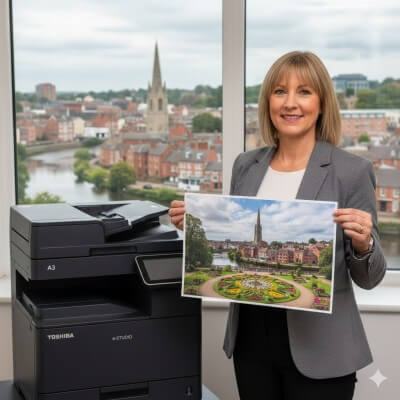
What should your next photocopier do better? Start with the jobs it has to handle.
Slow print queues, awkward scanning and repeated faults are different problems. Replacing the machine is useful when the proposed equipment addresses the actual difficulty.
Everyday documents
Letters, reports and routine records need dependable output. Consider how many people share the machine and whether it becomes a bottleneck when several jobs arrive together.
Paperwork into digital files
If staff spend time scanning, the document feeder, supported destinations and user setup deserve attention alongside print speed. Explain what happens to the files after they leave the scanner.
Colour, paper size and finishing
Separate features that are regularly used from ones that simply came with the old device. A3 paper handling or stapling can be valuable, but the specification should reflect genuine demand.
Four photocopiers to consider. Two manufacturers. A3 and A4 choices.
These are starting points for a conversation, rather than a fixed recommendation for every office. We check the device configuration and workload before proposing a model.
Toshiba e-STUDIO 2525AC
A 25ppm A3 colour multifunction photocopier for teams that combine normal A4 work with larger documents and shared copying or scanning.
Toshiba e-STUDIO 331AC
A compact 33ppm A4 colour multifunction printer to consider where the team needs office printing and scanning without an A3 device.
Katun Arivia C2125
A 25ppm A3 colour alternative when comparing paper format, multifunction capability and the commercial fit of the equipment.
Katun Arivia C3135
A 35ppm A3 colour option for a busier shared workload, assessed alongside paper handling, scanning and expected running costs.
Ask about the actual machine and options available. New and professionally prepared used equipment can both be considered; the quoted configuration matters more than the model name alone.
Pay for the machine in a way that fits the organisation.
Purchase, finance and rental create different commitments. We can explain the alternatives once the equipment requirement is established.
Buy the equipment
Outright purchasePaying outright can suit an organisation that wants ownership and has the capital available. Agree how maintenance will be handled after purchase as part of the same decision.
Arrange a lease
Equipment financeFinance spreads the equipment payment over its agreed term. Look at the total payable and the service arrangement alongside the regular payment.
Use a rental arrangement
Temporary requirementsA limited-duration requirement may call for rental instead of a conventional finance term. Discuss the expected dates, usage and delivery or collection arrangements.
Understand the bill before comparing the headline price.
Two proposals with similar monthly payments can cover quite different equipment and support. Put the individual costs beside your expected usage.
Equipment and remaining finance
Establish the specification, whether it is new or used, the payment schedule and the agreed term. If an existing machine is still financed, account for the remaining commitment before treating an upgrade as a saving.
What each page costs
Check the mono and colour service CPC, how pages are counted and whether any minimum applies. Colour detection and paper-size rules can affect the bill as well as the quoted rate.
What happens when it needs attention
Identify the covered parts, labour, consumables and support tasks. Ask about exclusions so a general promise of service can be compared with the written scope.
Any separate ongoing charges
Check whether scanning, monitoring, software or other functions introduce an additional recurring cost. Agree what is necessary for the setup instead of comparing the equipment payment on its own.
Camelott’s standard service approach has no minimum billing. The proposal confirms your actual terms and any fixed charges; equipment finance is a separate payment commitment.
New equipment is one option. A well-prepared used machine is another.
A smaller equipment budget does not remove the need for a suitable specification and dependable support.
Assess the individual device
Condition, meter history, fitted options and remaining parts support influence whether a used photocopier makes sense. Two devices with the same badge can have very different histories.
Match the planned period of use
Consider how much work the machine will do and how long it needs to remain useful. A lower initial cost is worthwhile when the device and support plan are appropriate for that period.
Make scanning part of the specification. Not an afterthought.
For many workplaces the copier is also the route from paper records to a shared digital workflow. Describe that workflow before installation.
Where the files need to go
We can discuss supported email, folder and cloud destinations with your IT contact. Authentication, permissions and any licences need to be checked for the proposed device.
How people reach the printer
Print queues, drivers and compatible mobile or device applications should reflect the computers and users in the office. Available AirPrint, Microsoft 365 and Google workflows depend on compatibility.
Who can collect the output
Confidential documents may benefit from supported PIN or authenticated release. User access and security options are assessed against the selected equipment and the organisation’s requirements.
Keep one route for equipment and print support.
Camelott’s technical team supports Shrewsbury from Telford. The first task is to identify what has stopped working and which people or functions are affected.
Investigate the symptoms
A failed print job may involve a queue, driver or network setting rather than a broken part. Suitable printing and scanning faults can be investigated remotely before planning a visit.
Maintain the agreed equipment
When a hardware issue needs physical attention, attendance is arranged according to the fault, service terms and engineer availability. There is no blanket arrival-time promise for every call.
Coordinate consumables
Monitoring and toner replenishment can form part of the agreed managed service. Confirm the supply arrangements and what users should do when the machine reports a warning.
Explain the day-to-day operation
Installation can include the agreed user setup and practical introduction. Make sure staff know how to use the functions they need and how to report a fault clearly.
Installing a photocopier in Shrewsbury? Plan the equipment’s route indoors.
Access details can be as important as the delivery address. Tell us what lies between the unloading point and the intended position.
Town-centre offices
Check unloading opportunities, restricted delivery times, reception access and the route through the building. Mention narrow access, steps or lift limitations before arranging delivery.
Business parks and schools
Provide the site contact, parking instructions and any visitor or security procedures. A coordinated appointment helps avoid an installation arriving when the relevant staff are unavailable.
The IT preparation runs alongside the physical plan: agree network access, user devices and scan destinations with the person responsible for the system.
Equipment for the team using it every day.
The same page count can represent very different requirements in a professional practice, school or growing commercial office.
Professional practices
Consider document scanning, access to shared equipment and the handling of confidential output. The useful specification may depend more on workflow than on maximum print speed.
Schools and educational settings
Discuss busy periods, colour resources, shared users and the way staff scan or reproduce teaching material. Installation and support need to fit the site’s procedures.
Growing offices and branches
Look at current demand and realistic changes in user numbers. It may be more practical to change the distribution of devices than to replace one machine with a much larger model.
What customers say about Camelott® support.
Feedback from Camelott customers about equipment, installation and ongoing support. These are general customer testimonials, rather than a list of Shrewsbury-only installations.
“Absolutely the right choice.”
“As we run a 24-hour business, speed and reliability are of the utmost importance. The ongoing management and support is second to none. Nothing is too much trouble for John and the team.”
Laura — Mersey Rail
“Better than previous suppliers.”
“Camelott® provided new machines where others were leasing secondhand for more money. Jason and John personally assessed our needs. We now service multiple offices with them without issue.”
Ajaz — Kenneth Jones Solicitors
“Proactive, superb support.”
“The team is superb. From setting up all our computers to proactively ordering toner before we even knew it was needed — I have no hesitation in recommending Camelott® to others.”
James — Zenith Financial Planning
Neil — Sterling Networks
“Within 30 mins we just had to press print. Voila!”
Tom — TWS Direct
“Honest, helpful and diligent. 100% recommended.”
Kyle — BJS
“Great guys, quick turnaround, solid service.”
Office equipment supply throughout Shrewsbury.
We can arrange photocopier supply, setup and agreed support for organisations in the town centre and surrounding business and residential areas.
- Shrewsbury Town Centre
- Frankwell
- Abbey Foregate
- Battlefield
- Meole Brace
- Bayston Hill
- Sundorne
- Harlescott
- Shrewsbury Business Park
- Shrewsbury Retail Park
- Monkmoor
- Belle Vue
- Emstrey
- Bicton Heath
- Copthorne
Include the site postcode and access details when requesting a quote so installation and support can be planned for the actual premises.
Questions about your next photocopier? 24 useful answers.
Equipment, finance, installation and support questions for Shrewsbury organisations.
What kinds of photocopiers do you supply in Shrewsbury?
Camelott supplies office printers and multifunction photocopiers in A4 and A3 formats. Colour, copying, scanning, paper capacity and optional finishing are matched to the requirement rather than bundled into one standard office package.
Can you help us choose between the four machines shown?
Yes. The models illustrate different formats and speeds. Tell us the number of users, typical jobs and monthly output, and we can discuss which configuration is useful for the work rather than selecting on speed alone.
Would an A4 multifunction printer be enough for our office?
It may be, especially when nearly all documents use A4 and floor space is limited. Check scanning needs, paper capacity and print costs as well as whether anyone actually needs A3.
When is an A3 photocopier worth considering?
A3 can be useful for larger spreadsheets, resources and other oversized documents. Larger devices may also offer additional trays or finishing, depending on configuration. Those features should justify their place in the proposal.
Do we have to lease the machine?
No. Purchase and rental can be considered alongside finance. The intended use, available budget and preferred ownership position help determine the appropriate route.
What should we compare in a photocopier lease quotation?
Compare the specification, new or used status, payment term, total finance commitment and the service arrangement. Include any existing settlement and recurring extras so the comparison reflects the whole decision.
Can we rent equipment for a temporary Shrewsbury office?
Discuss the dates, expected print volume and any setup requirements. Rental is subject to suitable equipment being available and agreement on delivery, installation and collection.
Are professionally prepared used photocopiers available?
They can be, subject to stock and the requirement. Ask about the actual device, meter count, condition, fitted equipment and future service support before committing to it.
Does a used machine always have lower running costs?
No. A lower equipment price does not determine the service cost or how well the machine fits the workload. Compare the actual CPC, likely usage, condition and support coverage with the other suitable choices.
What does the cost per copy pay for?
CPC is the agreed service charge for recorded mono or colour output. The proposal should define the coverage, meter rules and exclusions; paper and other items should not be assumed to be included without checking.
Is there a minimum service print volume?
No minimum billing applies as standard to Camelott’s normal service structure. Your proposal confirms the agreed billing terms. Finance payments remain separate from the number of pages produced.
Can the service cover toner, repair parts and labour?
Yes, these can be included in a managed arrangement. Check the exact scope, exclusions and consumable supply process in the quotation so you know how routine support will work.
Can you assess an existing lease before replacing our machine?
Yes. Share its end date, payment and service details if available. Changing equipment may introduce settlement costs, so we consider whether replacing now or waiting makes more sense.
Can you install a machine in a Shrewsbury town-centre office?
Installation can be planned around the building’s access arrangements. Explain loading restrictions, reception procedures, stairs, lifts and any delivery windows before a date is agreed.
Do you serve Battlefield and Harlescott?
Yes. The Shrewsbury service includes Battlefield, Harlescott and other local business areas. Provide the premises postcode and any access instructions when enquiring.
Can you supply Shrewsbury Business Park?
Yes. We can discuss equipment, installation and agreed support for organisations at Shrewsbury Business Park, with the technical service coordinated from Telford.
What do you need from our IT provider?
We need the relevant contact and agreement on the print environment, scan destinations and necessary permissions. Clear responsibilities help the configuration fit your network and user devices.
Can you configure scan-to-email and network folders?
These can be assessed where the selected machine and IT environment support them. The intended destination, authentication and access permissions must be established during planning.
Will the printer work with Microsoft 365, Google or AirPrint?
Compatibility depends on the device, network, account setup and any required software. Explain the workflow you want to use so it can be checked before a feature is promised.
Can confidential prints wait until the user reaches the device?
Supported secure release or authenticated printing can help with that requirement. The available method and any software or licensing need to be checked against the proposed machine.
How should staff report a printing or scanning fault?
Describe the error, affected users and whether printing, copying or scanning still works. Note any recent change to the computer or network. That information helps the technical team start with the right investigation.
Do all faults need an engineer visit?
No. Suitable queue, driver, scan and configuration issues may be investigated remotely. Physical repairs need attendance, arranged according to the fault, service terms and available engineers.
Can you support schools and shared office equipment?
Yes. We can assess peak usage, shared access, scanning and relevant output controls. The agreed specification and support plan should also account for the premises’ installation and visitor procedures.
How do we request a photocopier quote?
Use Contact Us with the current machine, approximate monthly output, number of users and the functions you need. If you do not know those details yet, explain what is causing difficulty and we can help establish the requirement.
Find a photocopier that works for your office.
Tell us what you need to print, copy and scan, or what is wrong with the current setup. We can help compare suitable machines and explain the equipment and support costs.